Pull into a blue-lined bay in Santa Cruz, La Laguna or any of the busier towns and go looking for the old-style parking meter, and you’ll increasingly come up empty — plenty of streets across Tenerife have quietly shifted to app-only payment, with the physical machine either removed or left as a backup that barely anyone actually uses anymore. It catches a lot of visitors off guard, especially anyone used to a payment machine on every corner, and it’s exactly the kind of small logistical gap that turns a five-minute parking stop into a stressful ten minutes of searching for somewhere to pay before you can just get on with your day.
Skip the Meter
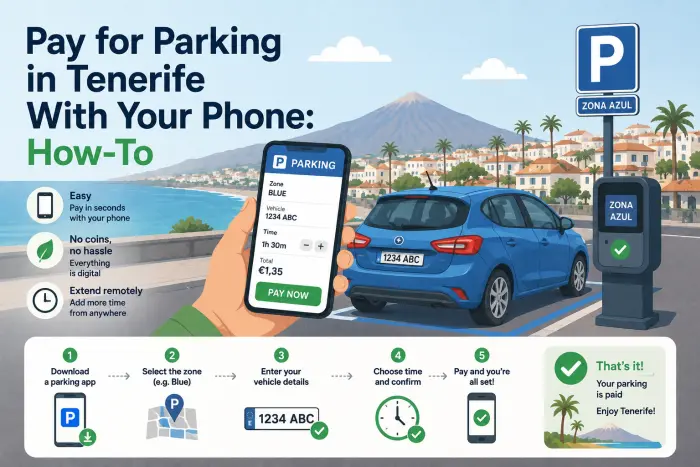
- Telpark and ElParking are the two apps that cover the vast majority of Tenerife’s regulated (blue zone) parking — download one before you arrive, not after you’ve already parked.
- Setup takes a few minutes: register with your phone number, add a card, and enter your rental car’s plate number so it’s saved for every future session.
- The app uses GPS to detect your zone automatically, so you’re not manually looking up rates or zone codes on a signpost.
- You can extend your session remotely without walking back to the car, and in most zones you can end it early and only pay for time actually used.
- No signal, no app — carry a backup plan (small change for a nearby working meter, or park in a paid garage instead) for the handful of spots where mobile payment genuinely isn’t an option.
Do you need an app to pay for parking in Tenerife, or can you still use a meter? 🅿️
In most of the island’s regulated blue zones, yes, you increasingly need the app — while some streets still keep a working ticket machine as a fallback, many others have removed them entirely or left machines that are out of service more often than not. The colour-coded system itself hasn’t changed: blue lines mean paid, time-limited parking during regulated hours, green means resident-only, and white or unmarked kerbs are generally free where you find them (our full breakdown of Tenerife’s parking colours and free spots covers that system in detail). What’s changed is simply the mechanism for actually paying once you’ve found a blue-lined bay — app-based payment has become the default rather than the exception across the island’s towns.
Which app should you actually download — Telpark or ElParking? 📲
Both work, and which one you need can genuinely depend on the specific municipality, so it’s worth having either on your phone before you set off rather than discovering mid-trip that the town you’re in only supports the other one. Telpark and ElParking are the two dominant regulated-parking apps operating across Spain, including the Canary Islands, and both cover Santa Cruz de Tenerife along with a number of the island’s other towns. Signage at the parking zone itself, or a quick search for the specific street name plus “parking app,” usually confirms which one a given area actually uses — some towns support both.
How does paying for a space actually work, step by step?
Open the app, and it’ll typically use your phone’s GPS to detect which regulated zone you’re standing in automatically, saving you from cross-referencing a zone number printed on a nearby sign. From there you select your saved vehicle (the plate number you registered when setting up the account), choose how long you want to pay for, and confirm — the whole process, once your account is set up, usually takes under a minute. Most apps also send a notification as your paid time is running low, which is a genuinely useful upgrade over the old system of guessing how long you’ll actually need and either overpaying or racing back to feed the meter.
| Step | What happens |
|---|---|
| 1. Set up account | Register phone number, add payment card, save your rental car’s plate |
| 2. Arrive and park | Open app; GPS detects the regulated zone automatically |
| 3. Start session | Select vehicle, choose duration, confirm |
| 4. Get notified | App alerts you before your paid time runs out |
| 5. Extend or end | Top up remotely, or end the session early for a partial refund in most zones |
Can you end your parking session early and get money back?
Yes, in most regulated zones — a genuinely useful feature that a physical ticket machine never offered. If you paid for two hours but you’re back at the car after forty minutes, ending the session through the app typically means you’re only charged for the time you actually used, rather than the full block you paid upfront. This is worth doing as a habit rather than just letting a paid session run out unused, since it’s essentially free money back on every stop where your plans change or you finish up faster than expected.
What happens if you don’t have signal or the app won’t load?
This is the genuine weak point of an app-only system, and it’s worth having a plan for rather than being caught out by it. If you’re in an area with poor signal (less likely in town centres, more likely in some outer neighbourhoods) or your phone’s data simply isn’t cooperating, look for a nearby working meter as a backup, or consider using a paid car park instead of street parking for that particular stop. It’s also worth downloading whichever app you’ll need before you need it and while you have solid wifi or signal, rather than trying to register an account and add a card for the first time standing next to your parked car with one bar of signal.
Are there multi-day passes worth buying for a longer stay?
If you’re basing yourself in one town for several days, yes — both major apps offer multi-day tourist passes that work out considerably cheaper than paying for individual sessions day after day, particularly useful if you’re exploring a base like Santa Cruz on foot for a few days rather than driving somewhere new every morning. It’s worth checking the app’s options screen for a pass specific to tourists or extended stays before defaulting to paying per session, since the per-day rate on these passes is usually noticeably better once you’re parking in the same zone repeatedly.
🚗 Discover Tenerife – Best Car Rental Deals
Compare top-rated suppliers, no hidden fees & free cancellation included.
What if you get a fine anyway — can you pay that through the app too?
In many cases, yes — both Telpark and ElParking let you pay a parking fine directly through the app if one’s issued while you’re in a session (or shortly after), which is considerably simpler than tracking down a separate payment portal or dealing with paperwork days later. This is specifically for parking-related fines tied to the regulated zone system, not speeding or other traffic offences, which follow the entirely separate process of being billed through your rental company instead. If a fine does show up, checking the app’s history or notifications section first is worth doing before assuming you need to chase it down some other way.
FAQ
Do I need to download a parking app before I arrive in Tenerife? It’s worth it, yes — setting up an account, adding a card and saving your plate takes a few minutes and is much easier done with solid wifi before you’re standing next to a parked car trying to register for the first time.
Is street parking free anywhere in Tenerife, or is it all paid now? Plenty of free (white/unmarked) spots still exist across the island’s towns — it’s specifically blue-zone regulated parking that requires payment, and increasingly that payment runs through an app rather than a meter.
Can I use the same parking app across the whole island, or does it vary by town? It varies — Telpark and ElParking between them cover most of Tenerife’s regulated zones, but a specific town may support only one of the two, so having both installed removes any guesswork.
What happens if I forget to end my parking session and just walk away? You’re simply charged for the full duration you originally selected — nothing extra happens, but you also don’t get the partial refund you’d have received by ending the session early once you were done.
Is blue zone parking free on Sundays and public holidays in Tenerife? In many zones, yes — blue zones commonly run paid restrictions on weekdays and Saturday mornings only, with Sundays and public holidays typically free, though it’s worth checking the signage for the specific street, since this varies by municipality.
Can I pay for parking with cash if I don’t want to use an app? It depends on the specific street — some retain a working meter as a cash-accepting backup, but a growing number of zones are app-only, which is exactly why it’s worth having one installed rather than relying on finding a machine.
Do rental car companies charge extra for parking fines the same way they do for speeding fines? Parking fines paid directly through a parking app are usually resolved without involving the rental company at all, unlike speeding fines, which are billed to the car’s registered keeper and typically come with a separate rental company admin fee on top.