Most people navigating Tenerife’s roads today aren’t using a dashboard GPS unit at all — they’re using Google Maps or Apple Maps on their own phone, which means the question that actually matters isn’t which car has a built-in navigation system, it’s whether your phone has data the moment you land. Get this sorted before you arrive, and the rest of the trip’s driving logistics fall into place. Get it wrong, and your first hour on the island can be spent hunting for a phone shop instead of actually driving anywhere.
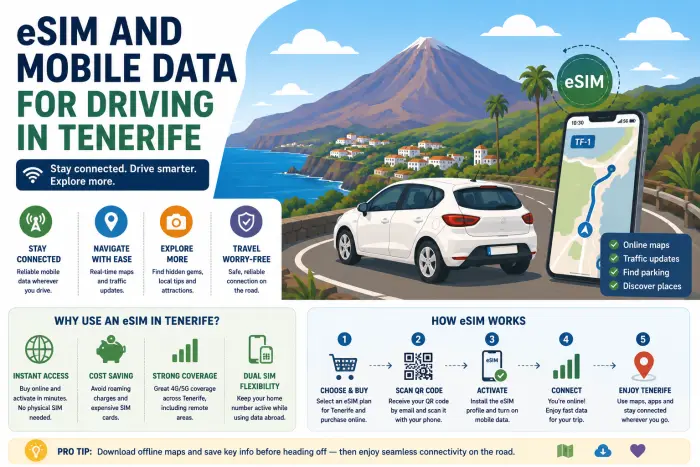
The short of it: the Canary Islands are part of Spain and the EU for mobile network purposes, so travellers with an EU SIM typically get the same “roam like at home” coverage they’d have anywhere else in Spain — no extra charges, nothing to set up. Travellers from outside the EU generally have three realistic options: pay their home provider’s roaming rates (usually the most expensive), buy a local prepaid SIM from Movistar, Vodafone, or Orange once they’ve found a store, or install a travel eSIM before they fly and activate it the moment they land. One detail almost every generic guide misses: Tenerife South Airport doesn’t have an on-site SIM card shop, which has genuinely stranded travellers expecting to buy one on arrival. If you’re not already covered by an EU plan, sort your data out before you fly rather than counting on the airport.
📱 Why This Matters More Than You’d Think
This site has a dedicated guide to in-car GPS hire for anyone who wants a built-in dashboard unit, but the honest reality for most travellers today is that a phone with data and Google Maps does the job just as well, often better, and without an extra daily rental charge. The entire question, then, becomes about your phone’s connectivity rather than the car itself — and it’s worth sorting out before you’re standing in an arrivals hall trying to find a 4G signal.
🇪🇺 If You Have an EU SIM: You’re Probably Already Covered
This is the simplest case by far. Because the Canary Islands are part of Spain and therefore the EU for telecoms purposes, travellers with a SIM from an EU/EEA provider typically get the same data allowance and rates here as they would back home, under the EU’s “roam like at home” rules. In practice, this usually means doing absolutely nothing differently — your phone connects to a local network automatically on arrival, using your existing plan.
🌍 If You’re From Outside the EU: Your Three Real Options
For travellers from the UK, US, or elsewhere outside the EU, roaming agreements vary considerably by provider, and it’s worth comparing the realistic options before you fly:
| Option | How It Works | Best For |
|---|---|---|
| 📶 Roam on your home SIM | Just works on arrival, billed at your provider’s roaming rates | Short trips, minimal data use, or providers with reasonable rates already included |
| 🏪 Local prepaid SIM (Movistar, Vodafone, Orange) | Bought in person at a store, passport required, generally good value | Longer stays, or travellers who want a local number too |
| 📲 Travel eSIM | Installed digitally before you fly, activated on arrival | Anyone who wants data working the moment they land, with no store visit needed |
A local prepaid SIM is often genuinely good value once you’ve actually got one in hand — the issue, as covered below, is reliably getting hold of one without losing your first day to the search.
✈️ The One Thing Almost Every Guide Gets Wrong: No SIM Shop at the Airport
Plenty of generic travel advice assumes you can simply buy a SIM card at the arrivals hall the way you might at many other international airports. Tenerife South Airport doesn’t have an on-site SIM card shop. Travellers expecting to buy one on landing have ended up taking a taxi into Los Cristianos and queueing for over an hour at a phone store before getting connected — a genuinely frustrating start to a trip, especially if you’re trying to collect a hire car from Tenerife South Airport and start driving the same day. If you’re flying into Tenerife North Airport instead, it’s safest to assume the same applies rather than counting on finding a shop there either. If you’re relying on a physical SIM rather than an eSIM, plan to buy it from a store in town, and budget real time for it.
📲 Setting Up an eSIM Before You Fly
This is exactly the situation a travel eSIM solves, and it’s worth the five minutes it takes to set up before departure:
- 📶 Buy your eSIM plan online before you travel, from any of the well-established providers serving Spain or the Canary Islands specifically.
- 📷 Install it using the QR code provided, while you still have a stable Wi-Fi connection — most providers recommend doing this before you fly rather than at the airport.
- ✈️ Leave it inactive until you land, then select it as your data source and turn on data roaming for that specific eSIM line in your phone’s settings — this single step trips up a surprising number of people, since it feels counterintuitive to “roam” within what’s still technically Spain.
- 📞 Keep your home SIM active for calls and texts if your phone supports dual SIM, while the eSIM handles data — most eSIM plans are data-only and don’t include a local number, though apps like WhatsApp and FaceTime work fine over the data connection regardless.
🏔️ Signal in the Mountains: What to Actually Expect
Coverage across the resort coastline and main towns is generally strong and reliable, regardless of which network or eSIM you’re using. It thins out noticeably in some of the island’s most dramatic driving terrain, which is worth knowing in advance if your itinerary includes:
- 🌲 Anaga Rural Park, where dense forest and steep terrain create genuine signal dead zones.
- 🏞️ Masca, where the deep valley and narrow roads have similarly patchy coverage.
- 🌋 Mount Teide, where altitude and remoteness can affect signal quality, despite the area’s popularity.
None of this is unique to any particular network or SIM type — it’s simply a function of terrain, and worth planning around the same way regardless of how you’ve set up your data.
🚗 Discover Tenerife – Best Car Rental Deals
Compare top-rated suppliers, no hidden fees & free cancellation included.
🗺️ Offline Maps: The Backup Worth Having Regardless
Whichever connectivity option you choose, downloading an offline map of Tenerife in Google Maps or a similar app before you set off on any of the island’s more remote drives is a sensible habit. It costs nothing, takes a couple of minutes over Wi-Fi, and means a brief signal dead zone on a demanding mountain road doesn’t leave you genuinely lost rather than just temporarily without live traffic updates.
✅ Connectivity Checklist Before You Fly
- 🇪🇺 Check whether your existing plan already covers Spain/the EU — if you’re an EU traveller, you likely don’t need to do anything else.
- 📲 Set up a travel eSIM in advance if you’re not already covered, rather than planning to sort it on arrival.
- ✈️ Don’t rely on buying a SIM at Tenerife South Airport — there isn’t an on-site shop.
- 🔧 Remember to enable data roaming for your eSIM line once you land, even though it can feel like an unnecessary step.
- 🗺️ Download offline maps before any drive into Anaga, Masca, or up toward Teide.
- 📞 Set up dual SIM correctly in advance if you want to keep your home number for calls while using a separate data plan.
❓ Frequently Asked Questions
Do I need a local SIM card to drive in Tenerife? Not necessarily. If you have an EU SIM, your existing plan likely already covers the Canary Islands under standard EU roaming rules. If you’re travelling from outside the EU, a local SIM or eSIM is generally the most cost-effective way to get reliable data for navigation.
Can I buy a SIM card at Tenerife South Airport? No — there’s no SIM card shop on-site at Tenerife South Airport. Travellers expecting to buy one on arrival have had to travel into a nearby town to find a store, which can take well over an hour.
Is an eSIM better than a physical SIM for driving in Tenerife? For most travellers, yes, simply because it can be set up before you fly and activates automatically on arrival, avoiding the need to find a phone shop at all. A physical SIM can offer better value for longer stays once you’ve actually got one, but requires an in-person visit to a store.
Does EU roaming actually cover the Canary Islands? Yes. The Canary Islands are part of Spain and the EU for telecoms purposes, so EU/EEA travellers typically get the same roaming-free coverage here as anywhere else in the EU.
Why do I need to turn on “data roaming” for an eSIM if I’m not really roaming? This is just how eSIM activation works technically, even within what’s still Spanish territory. It trips up a fair number of travellers, but it’s a simple settings toggle once you know to look for it.
Will my navigation app work without signal in places like Anaga or Masca? Live features like traffic updates won’t work without signal, but a map you’ve downloaded for offline use beforehand will still show your route and location, which is exactly why downloading one in advance is worth doing for these specific areas.
Should I get an in-car GPS unit instead of relying on my phone? Either works, and it depends on personal preference — see our car hire with GPS guide if you’d rather have a dedicated dashboard unit instead of relying on your phone’s data and battery.
Is mobile coverage generally good across Tenerife? Yes, across the resort coastline and main towns. It’s noticeably patchier in remote mountain and forest terrain, which is worth planning around with offline maps rather than assuming constant signal everywhere you drive.
🏁 Final Verdict: Sort It Before You Fly, Not After You Land
Getting online in Tenerife is straightforward once you know the two things most generic guides skip: EU travellers usually don’t need to do anything at all, and everyone else is better off sorting an eSIM or local SIM plan before arrival rather than assuming the airport has a quick fix waiting. Add an offline map for the mountain roads, and your phone becomes a perfectly capable substitute for a dedicated GPS unit.
👉 Compare car hire deals in Tenerife and arrive ready to drive from the moment you land. This guide is part of our full Tenerife car hire guide — for the basics of the road itself, see our driving in Tenerife guide.