This is a question that generates surprising disagreement among experienced Tenerife travellers. Some swear by a proper GPS unit — the larger screen, the offline reliability, the lack of phone battery drain. Others say paying for in-car GPS is one of the more unnecessary expenses in modern car hire, now that every smartphone has Google Maps and most cars have Bluetooth connectivity.
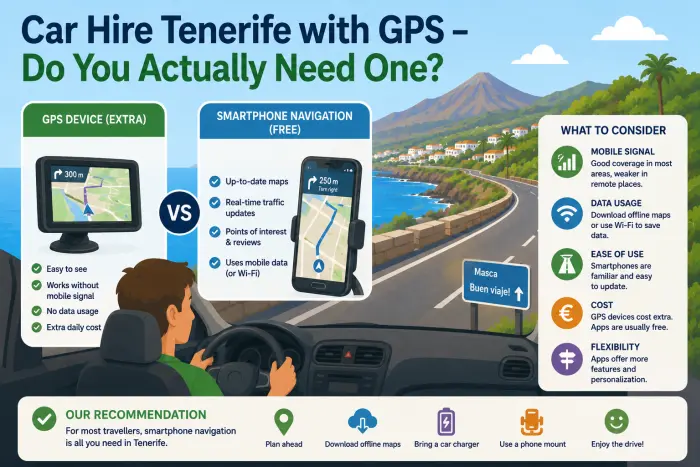
Both positions have merit. The honest answer depends on where you’re driving, how comfortable you are with smartphone navigation, whether your phone has adequate data roaming, and whether you’re planning to venture into the mountain roads where signal drops and offline maps become genuinely important.
Before deciding, it helps to understand the roads you’ll actually be driving — from the well-signed TF-1 motorway to the winding mountain lanes of Anaga and TF-436. The navigation challenge varies dramatically by route.
Here’s the full picture: what GPS in a Tenerife rental car actually costs, which companies include it free, when it’s genuinely useful, and when it’s an unnecessary daily expense you can skip entirely.
💶 What Does GPS Cost as an Add-On in Tenerife?
In-car GPS navigation units are available as paid extras from virtually every rental company at TFS and TFN. Typical daily rates:
| Company Type | GPS Daily Rate | 7-Day Total | Notes |
|---|---|---|---|
| International chains (Hertz, Europcar, Sixt) | €8–€15/day | €56–€105 | Portable or built-in |
| Budget brands (Goldcar, Record Go) | €5–€10/day | €35–€70 | Portable TomTom or Garmin |
| Local Canarian companies (Cicar, TopCar) | €4–€8/day | €28–€56 | Available but rarely necessary |
| Premium vehicles (Sixt, Hertz top tier) | Often included | — | Integrated screen navigation |
A week of GPS rental from a standard international company typically costs €56–€105 on top of the base hire rate. On a budget rental where the car itself costs €80–€120 for the week, a GPS add-on can represent 50–80% of the entire base hire cost — which is why many experienced visitors skip it entirely.
📱 The Honest Answer — GPS vs Smartphone Navigation
GPS navigation units are genuinely useful, but most experienced Tenerife drivers find smartphone navigation with pre-downloaded offline maps entirely sufficient for the majority of the island’s roads. Here’s a realistic comparison:
| Feature | In-Car GPS | Smartphone (Google Maps / Apple Maps) |
|---|---|---|
| Map accuracy | Good (if updated) | ✅ Excellent — real-time updates |
| Traffic data | Basic or none | ✅ Live traffic, rerouting |
| Offline use | ✅ Yes (pre-loaded) | ✅ Yes (if downloaded in advance) |
| Screen size | Dedicated screen | Phone screen (varies) |
| Battery impact | None | Drains battery — needs charger |
| Cost | €5–€15/day extra | Free |
| Signal required | No | No for offline, Yes for live updates |
| Up-to-date maps | Only if recently updated | Always current |
The one scenario where an in-car GPS genuinely wins: deep mountain roads with no phone signal. Anaga Rural Park, the TF-436 to Masca, sections of the TF-24 ridge road — these can have patchy or no mobile coverage. If you’re driving these routes without pre-downloaded offline maps and your data roaming is off, a GPS unit is a genuine safety net.
For everywhere else — the TF-1 motorway, resort areas, Puerto de la Cruz, Santa Cruz — a smartphone with Google Maps is entirely sufficient.
✅ When GPS Is Worth Paying For
1. You’re not downloading offline maps in advance If you’re not planning to download Tenerife maps before you fly, a GPS unit removes the dependency on mobile signal entirely. This matters most on the Masca road (TF-436) where signal drops from Santiago del Teide onward, and in the deeper sections of Anaga Rural Park where TF-12 and TF-134 lose coverage reliably.
2. Your phone has poor battery life GPS navigation is one of the heaviest battery consumers on a smartphone. A full day of navigation — say, driving to Teide and back, with multiple stops — can drain an older phone from 100% to near-empty. If you’re also using the phone for photos and communication, a dedicated GPS removes the conflict. A car charger is the cheaper solution, but a GPS unit eliminates the concern entirely.
3. You’re sharing the car between two unfamiliar drivers If two drivers are splitting the rental — as often happens on longer road trips like the 7-day Tenerife itinerary — a dedicated GPS on the dashboard keeps navigation visible to both without either person managing a mounted phone.
4. You’re doing specific mountain routes The best roads in Tenerife include several where signal is genuinely unreliable: TF-436 to Masca, TF-12 through Anaga, and the upper sections of TF-21 and TF-24 toward Teide. Pre-downloaded offline maps handle these adequately, but a GPS unit works without any advance setup.
❌ When GPS Is Probably Not Worth It
Resort-based trips: If your driving is predominantly between the southern resorts, TFS Airport, beaches, and the occasional theme park like Siam Park or Loro Parque — Google Maps handles all of it with full mobile signal throughout. The TF-1 and TF-47 motorways are completely covered.
🚗 Discover Tenerife – Best Car Rental Deals
Compare top-rated suppliers, no hidden fees & free cancellation included.
Short transfers: Pages like Tenerife South Airport to Costa Adeje or to Los Cristianos involve straightforward, well-signed routes where no dedicated GPS is needed.
Drivers comfortable with offline maps: Download the Tenerife region in Google Maps before you fly. The entire island fits in one download and works with zero mobile signal. Free, current, accurate. This solution covers every route in our best roads guide adequately.
Families and groups who’ve already paid for child seats, insurance upgrades, and possibly a larger vehicle — adding GPS on top pushes the extras budget significantly. In most family driving scenarios (resort beaches, Siam Park, Los Gigantes), smartphone navigation is entirely adequate.
🏢 Which Companies Include GPS Free in Tenerife?
Most companies charge for GPS as an add-on. Some higher-tier vehicles include integrated navigation as standard. For full company comparisons, see our best car hire companies in Tenerife guide.
| Company | GPS Included Free? | Conditions | Notes |
|---|---|---|---|
| Sixt | ✅ In premium vehicles | Business class and above | Integrated screen navigation |
| Hertz | ⚠️ Some categories | Prestige and above | Check specific vehicle listing |
| Europcar | ❌ Usually paid | All categories | Portable unit available |
| Goldcar | ❌ Paid add-on | All categories | ~€5–€8/day |
| TopCar | ❌ Paid add-on | All categories | Not usually needed |
| Cicar | ❌ Paid add-on | All categories | Well-signed island |
| Record Go | ❌ Paid add-on | All categories | Budget company |
| Discovercars filter | ✅ Filter available | Some listings | Filter “GPS included” to show free options |
📱 The Free Alternative — How to Set Up Offline Navigation
If you decide to use your smartphone instead of paying for GPS, here’s the exact setup to complete before you fly:
Google Maps offline:
- Open Google Maps on your phone while on Wi-Fi
- Search “Tenerife” → tap the name at the bottom → tap “Download”
- Adjust the area to cover the full island → Download
- Works fully offline — routing, navigation, turn-by-turn — without any mobile signal
This covers every road in Tenerife including the Anaga ridge road (TF-12), TF-436 to Masca, TF-21 to Teide, and all resort and city routes.
Phone mounting: A windscreen or dashboard phone mount is a worthwhile €5–€10 purchase. In Spain, holding a phone while driving is illegal — the fine is significant. A mounted phone with navigation running is perfectly legal and keeps your eyes on the road.
EU roaming: UK visitors post-Brexit no longer have guaranteed free EU roaming — check your provider’s Spain rates. Offline maps eliminate this concern entirely.
🔍 Navigation by Specific Route — What to Expect
| Route | Signal | GPS Needed? | Notes |
|---|---|---|---|
| TF-1 / TF-5 motorways | ✅ Full | ❌ No | Extensively signed — straightforward |
| TF-21 to Teide | ⚠️ Patchy above 1,500m | ⚠️ Offline maps | Pre-download or GPS for upper sections |
| TF-436 to Masca | ❌ Unreliable | ✅ Recommended | Signal drops from Santiago del Teide onward |
| Anaga TF-12, TF-134 | ❌ Patchy to absent | ✅ Recommended | Deepest parts have no signal |
| TF-47 west coast / Los Gigantes | ✅ Good | ❌ No | Well-maintained, signed throughout |
| North coast TF-42 / Garachico | ✅ Good | ❌ No | No issues with signal |
| Santa Cruz city | ✅ Full | ❌ No | Full urban coverage |
| Punta de Teno | ❌ Very weak | ✅ Yes | Remote western tip — download offline first |
🙋 Frequently Asked Questions — Car Hire Tenerife with GPS
Do Tenerife rental cars come with GPS included?
Most standard rental cars in Tenerife do not include GPS as standard — it’s typically a paid add-on at €5–€15 per day. Premium vehicles from Sixt and some Hertz categories include integrated screen navigation at no extra charge. When booking on Discovercars, filter for “GPS included” to find vehicles where navigation is built into the car’s infotainment system. For a full comparison of companies, see our best car hire companies guide.
Is it worth paying for GPS in a Tenerife rental car?
For most drivers — no. Smartphone navigation with pre-downloaded offline Google Maps is free, accurate, and up-to-date. The cases where GPS earns its daily cost: driving Anaga Rural Park or TF-436 to Masca where signal is unreliable, travelling without pre-downloaded maps, or using an older phone with poor battery life. For resort driving and motorway trips, a smartphone is entirely sufficient.
What is the best free navigation for driving Tenerife?
Google Maps with the Tenerife region pre-downloaded offline is the most reliable free option. Download it over Wi-Fi before you fly. This gives full turn-by-turn navigation with zero mobile signal — essential for routes like Masca and Anaga where signal drops.
Can I use my phone for navigation in Tenerife rental cars?
Yes — most modern rental cars have Bluetooth and many have Apple CarPlay or Android Auto. Connect your phone via USB or Bluetooth to display Google Maps on the car’s screen. Note that holding a phone while driving is illegal in Spain — use a mount or CarPlay, never hand-held.
Do I need mobile data for navigation in Tenerife?
Not if you download offline maps before you travel. Pre-downloading the Tenerife region in Google Maps gives full navigation without any data — essential if you’re concerned about UK roaming charges post-Brexit. You’ll lose live traffic updates but routing and turn-by-turn directions work perfectly offline.
Is Tenerife difficult to navigate without GPS?
Not on the main routes. The TF-1, TF-5, and key numbered roads are well-signed. Resort areas, airports, Teide, and the main towns are all clearly signposted. Where navigation support becomes useful: the winding mountain roads of Anaga (patchy signal) and TF-436 to Masca (unreliable signal from Santiago del Teide onward). Pre-downloaded offline maps handle both adequately.